




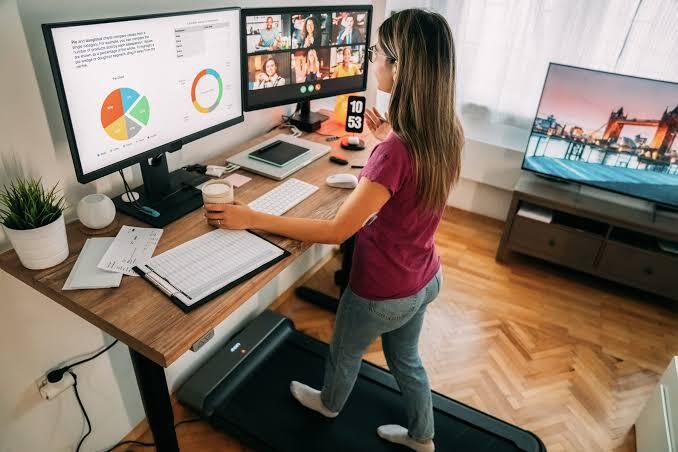
A standing desk is no longer just a trend for tech offices in Silicon Valley. It has become a practical solution for anyone who spends hours glued to a screen. If you’ve ever finished a workday with a stiff back, tired eyes, and a foggy brain, you already know why so many people are switching to a standing desk setup.
This guide breaks down everything you need to know: the real benefits, the common mistakes beginners make, expert-backed tips, and a comparison of standing desk types. Whether you’re a remote worker, a student, or someone managing a busy office, you’ll walk away knowing exactly how to use a standing desk the right way.
What Is a Standing Desk and Why Does It Matter?
A standing desk (also called a stand-up desk or sit-stand desk) is a height-adjustable workstation that lets you alternate between sitting and standing throughout the day. Unlike a traditional desk, it’s built to reduce the amount of time your body stays locked in one position.
Sitting for long, uninterrupted stretches has been linked to poor posture, sluggish circulation, and lower energy levels. A standing desk gives your body a way to reset without stepping away from your work.
How a Standing Desk Fits Into a Healthy Workday
Think of this desk as a tool for movement, not a magic fix. The real value comes from switching positions every 30 to 60 minutes. This small habit keeps your muscles active, supports better blood flow, and helps you stay alert during long meetings or deep-focus tasks.
Key Benefits of Using a Standing Desk
1. Reduces Back and Neck Strain
Alternating between sitting and standing takes pressure off your spine. Many users report noticeably less lower-back discomfort within a few weeks of consistent use.
2. Boosts Energy and Focus
Standing encourages better posture and circulation, which can translate into sharper concentration during afternoon slumps.

3. Supports Better Posture
A properly adjusted standing desk encourages a neutral spine position, reducing the slouching that comes from sinking into a chair.
4. Burns More Calories Than Sitting
Standing burns slightly more calories per hour than sitting. It’s not a replacement for exercise, but every bit of movement adds up over a workweek.
5. May Lower Long-Term Health Risks
Extended sitting has been associated with cardiovascular concerns. Reducing sedentary time is one small, manageable step toward better long-term health.
6. Improves Mood and Reduces Fatigue
Several workplace studies suggest that sit-stand desk users report feeling less fatigued and more positive by the end of the day.
7. Increases Workplace Flexibility
This desk adapts to your needs, whether you’re on a video call, writing a report, or brainstorming ideas on your feet.
Common Mistakes People Make With a Standing Desk
- Standing all day, every day — This can cause fatigue and joint strain. Balance is key.
- Wrong desk height — Elbows should sit at a 90-degree angle; screens should be at eye level.
- Ignoring footwear and mats — Standing on a hard floor without a cushioned mat can strain your feet and knees.
- Skipping movement breaks — A standing desk isn’t a substitute for walking or stretching.
- Poor monitor placement — A screen positioned too low or too high leads to neck strain, even while standing.
Expert Tips for Getting the Most Out of Your Standing Desk
- Start with 30-minute standing intervals and gradually increase.
- Use an anti-fatigue mat to reduce pressure on your feet.
- Keep your wrists straight and your keyboard at elbow height.
- Set a timer or use desk-height reminder apps to encourage regular position changes.
- Pair standing time with light stretching for added benefit.
Standing Desk Comparison Table
| Type | Best For | Price Range | Adjustability | Portability |
|---|---|---|---|---|
| Manual Crank Desk | Budget-conscious users | $150–$300 | Moderate | Low |
| Electric Adjustable Desk | Daily home/office use | $300–$700 | High | Moderate |
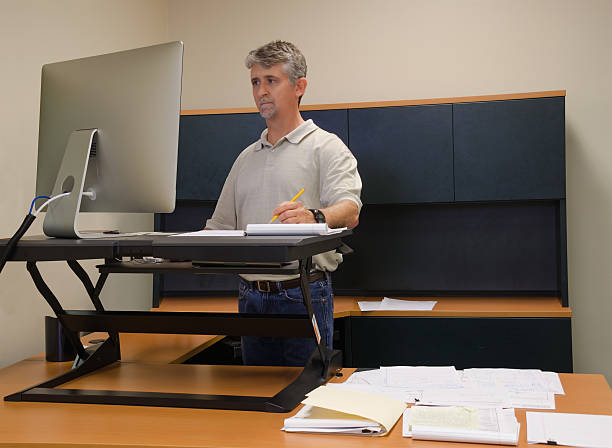
| Desktop Converter | Renters, small spaces | $100–$250 | Moderate | High |
| Standing Desk Treadmill | Active multitaskers | $500–$1,200 | High | Low |
Frequently Asked Questions
1. Is a standing desk actually good for you?
Yes, a standing desk can support better posture, reduce back discomfort, and improve circulation when used correctly. The key is alternating between sitting and standing rather than staying in one position all day. Most health experts recommend a balanced approach, aiming for roughly a 1:1 or 1:2 ratio of standing to sitting throughout your workday for the best results.
2. How long should I stand at a standing desk each day?
Most experts recommend starting with 30 to 60 minutes of standing per hour of work, then gradually building up. Standing for too long without breaks can cause fatigue or leg discomfort, so the goal is balance, not maximum standing time. Listen to your body and adjust based on comfort, especially during the first few weeks of use.
3. Can a standing desk help with weight loss?
A standing desk alone won’t cause significant weight loss, but it does burn more calories than sitting. Over a full workweek, this can add up modestly. It works best as part of a broader healthy routine that includes regular exercise, a balanced diet, and consistent movement breaks throughout the day.
4. What is the correct height for a standing desk?
Your elbows should form a 90-degree angle when typing, and your monitor should sit at eye level to avoid neck strain. Most electric desks let you save custom height presets, making it easy to switch between sitting and standing positions without needing to readjust everything each time.
5. Are standing desks good for people with back pain?
Many people with mild to moderate back pain find relief from alternating between sitting and standing. However, if you have a diagnosed spinal condition, it’s wise to consult a physician or physical therapist before making major changes to your workstation setup, since individual needs can vary significantly.
6. Do I need an anti-fatigue mat with a standing desk?
An anti-fatigue mat isn’t mandatory, but it significantly improves comfort by reducing pressure on your feet, knees, and lower back during standing periods. If you plan to stand for more than an hour at a time, investing in a quality mat is one of the simplest upgrades you can make.
7. What’s the difference between a manual and electric standing desk?
Manual standing desks use a hand crank to adjust height, which is budget-friendly but slower to operate. Electric standing desks use a motor for quick, one-touch height changes and often include programmable presets, making them more convenient for people who switch positions frequently throughout the day.
8. Can I use a standing desk converter instead of buying a new desk?
Yes, a standing desk converter sits on top of your existing desk and raises your monitor and keyboard to standing height. It’s a budget-friendly, portable option, especially useful for renters or anyone who isn’t ready to invest in a full desk setup.
Summary
A standing desk isn’t about standing all day; it’s about giving your body the freedom to move throughout your workday. From easing back pain to boosting focus and energy, the benefits are backed by both user experience and workplace research. Start slow, set your desk height correctly, and build standing intervals into your daily routine.
Ready to upgrade your workspace? Explore standing desk options that fit your budget and start building a healthier daily routine today.
Discover more trending content only on WorldSnipes.